ພາບລວມ Mach3
Mach3 ເປັນຊອບແວຄວບຄຸມ CNC ທີ່ມີປະສິດທິພາບແລະປະຕິບັດໄດ້ຖືກອອກແບບມາເພື່ອຄວບຄຸມ router CNC, ໂຮງງານ CNC, CNC plasma, ເຄື່ອງກຣຶງຊີເອັນຊີ, ແລະອື່ນໆ ເຄື່ອງມື CNC. ການໂຕ້ຕອບຊອບແວແມ່ນງ່າຍດາຍແລະ intuitive, ແລະຜູ້ໃຊ້ສາມາດປັບຕົວກໍານົດການທີ່ສອດຄ້ອງກັນຕາມຄວາມຕ້ອງການຂອງເຂົາເຈົ້າ. ແລະມັນມີຫນ້າທີ່ຫຼາຍຢ່າງເຊັ່ນ: ການທົດສອບການຄວບຄຸມຕົວເລກ, ເຄື່ອງຈັກທີ່ມີຄວາມແມ່ນຍໍາສູງຂອງພາກສ່ວນທີ່ສັບສົນແລະການເກັບກູ້ຂໍ້ມູນທີ່ສອດຄ້ອງກັນ.
ຊອບແວຄວບຄຸມ CNC Mach3 ເປັນລະບົບ CNC ເປີດ, ການດໍາເນີນງານງ່າຍດາຍ, ການບໍາລຸງຮັກສາສະດວກ, ເປີດ, ປະສິດທິພາບທີ່ຫມັ້ນຄົງ, ແລະລະບົບ CNC ໃຫມ່ທີ່ມີລາຄາຖືກ. ຄອມພິວເຕີ PC ມາດຕະຖານຖືກປ່ຽນເປັນເຄື່ອງຄວບຄຸມ CNC ເຕັມຮູບແບບ, ແລະຄວບຄຸມ CNC ສູງສຸດ 6 ແກນ, ສະຫນັບສະຫນູນຄວາມຫລາກຫລາຍຂອງ DXF, BMP, JPG, HPGL ຮູບແບບໄຟລ໌ input, ການສະແດງລະຫັດ G visual, ການຜະລິດລະຫັດ G ໂດຍກົງ, ການຄວບຄຸມຄວາມໄວ spindle, ການຄວບຄຸມ relay ຫຼາຍ, ການຜະລິດກໍາມະຈອນຄູ່ມື, ລວມທັງຈໍານວນຂະຫນາດໃຫຍ່ຂອງຍຸດທະສາດການປຸງແຕ່ງ, ຫນ້າຈໍສໍາຜັດ, ຈໍສະແດງຜົນວິດີໂອ, ຈໍສະແດງຜົນເຕັມ, ແລະຫນ້າຈໍ. ການຕິດຕາມການສະແດງຜົນແບບເຄື່ອນໄຫວ 3 ມິຕິ, ການຕັ້ງຄ່າເຄື່ອງມືອັດຕະໂນມັດ, ການປະຕິບັດການກະໂດດໂຄງການ (ຄວາມຊົງຈໍາຂອງຈຸດຢຸດ).
ຄຸນນະສົມບັດ Mach3
1. ຈໍສະແດງຜົນ Visual G-code.
2. ຄວາມສາມາດຂອງຫນ້າຈໍສໍາພັດ.
3. ການໂຕ້ຕອບທີ່ສາມາດປັບແຕ່ງໄດ້ຢ່າງເຕັມສ່ວນ.
4. ການຄວບຄຸມຄວາມໄວ spindle.
5. ການຜະລິດກໍາມະຈອນຄູ່ມື.
6. ການຄວບຄຸມ Relay ຫຼາຍ.
7. ວິດີໂອສະແດງເຄື່ອງ.
8. ການມີສິດເຕັມຫນ້າຈໍ.
9. ສ້າງ Gcode ຜ່ານ LazyCam ຫຼື Wizards.
10. ປັບແຕ່ງ M-Code ແລະ Macros ໂດຍໃຊ້ VBscript.
11. ອະນຸຍາດໃຫ້ນໍາເຂົ້າໂດຍກົງຂອງໄຟລ໌ DXF, BMP, JPG, ແລະ HPGL ຜ່ານ LazyCam.
12. ແປງເຄື່ອງຄອມພິວເຕີມາດຕະຖານໃຫ້ເປັນເຄື່ອງຄວບຄຸມ CNC 6 ແກນທີ່ມີຄຸນສົມບັດຄົບຖ້ວນ.
ຄໍາຮ້ອງສະຫມັກ Mach3
1. CNC Mill.
2. CNC Router.
3. ເຄື່ອງກຶງ CNC.
4. ເຄື່ອງ CNC Laser.
5. ເຄື່ອງຕັດ Plasma CNC.
Mach3 ເຮັດວຽກແນວໃດ?
Mach3 ແມ່ນປະເພດຂອງຊອບແວ CNC ທີ່ເຮັດວຽກຢູ່ໃນ PC ແລະປ່ຽນມັນເຂົ້າໄປໃນເຄື່ອງຄວບຄຸມເຄື່ອງຈັກທີ່ມີປະສິດທິພາບຫຼາຍແລະປະຫຍັດ. ເພື່ອດໍາເນີນການ Mach3, ທ່ານຕ້ອງການ PC ທີ່ໃຊ້ລະບົບປະຕິບັດການ Windows ທີ່ມີຢ່າງຫນ້ອຍໂປເຊດເຊີ 1GHz ທີ່ມີຫນ້າຈໍຄວາມລະອຽດ 1024 x 768 pixels. Mach3 ແລະໄດເວີພອດຂະໜານຂອງມັນຕິດຕໍ່ສື່ສານກັບຮາດແວຂອງເຄື່ອງຈັກຜ່ານພອດຂະໜານດຽວ ຫຼືພອດເຄື່ອງພິມ. ຖ້າຄອມພິວເຕີຂອງທ່ານບໍ່ມີພອດຂະຫນານ, ທ່ານສາມາດຊື້ກະດານຄວບຄຸມການເຄື່ອນໄຫວຈາກຜູ້ຂາຍພາກສ່ວນທີສາມທີ່ໃຊ້ພອດ USB ຫຼືອີເທີເນັດເພື່ອການສື່ສານ. ການນໍາໃຊ້ກະດານຄວບຄຸມການເຄື່ອນໄຫວສາມາດເອົາການໂຫຼດການປຸງແຕ່ງຢ່າງຫຼວງຫຼາຍຈາກຄອມພິວເຕີ, ດັ່ງນັ້ນທ່ານອາດຈະຕ້ອງການພິຈາລະນາການນໍາໃຊ້ຫນຶ່ງເພື່ອໃຫ້ໄດ້ປະໂຫຍດດ້ານການປະຕິບັດເຖິງແມ່ນວ່າຄອມພິວເຕີຂອງທ່ານມີພອດຂະຫນານ. Mach3 ສ້າງກໍາມະຈອນຂັ້ນຕອນແລະສັນຍານທິດທາງເພື່ອປະຕິບັດຂັ້ນຕອນທີ່ກໍານົດໂດຍໂຄງການສ່ວນ GCode ແລະສົ່ງພວກມັນໄປຫາຜອດຫຼືກະດານຄວບຄຸມການເຄື່ອນໄຫວ. ໄດເວີສໍາລັບມໍເຕີແກນຂອງເຄື່ອງຈັກຂອງທ່ານຕ້ອງຍອມຮັບເອົາກໍາມະຈອນຂັ້ນຕອນ March3 ແລະສັນຍານທິດທາງ. ເກືອບທັງຫມົດໄດເວີມໍເຕີ stepper ເຮັດວຽກແບບນີ້, ເຊັ່ນດຽວກັນກັບລະບົບ DC ແລະ AC servo ທີ່ທັນສະໄຫມທີ່ມີຕົວເຂົ້າລະຫັດດິຈິຕອນ. ລະວັງຖ້າທ່ານກໍາລັງແປງເຄື່ອງ NC ເກົ່າທີ່ servos ອາດຈະໃຊ້ຕົວແກ້ໄຂເພື່ອວັດແທກຕໍາແຫນ່ງຂອງແກນຍ້ອນວ່າທ່ານຈະຕ້ອງສະຫນອງໄດໃຫມ່ທີ່ສົມບູນສໍາລັບແຕ່ລະແກນ. ເພື່ອຕັ້ງຄ່າລະບົບ CNC ເພື່ອໃຊ້ຊອບແວ Mach3, ທ່ານຕ້ອງຕິດຕັ້ງຊອບແວຄວບຄຸມ Mach3 CNC ໃນຄອມພິວເຕີຂອງທ່ານ, ແລະເຊື່ອມຕໍ່ມໍເຕີຂອງທ່ານກັບພອດຂອງຄອມພິວເຕີ້ຢ່າງຖືກຕ້ອງ.
ການຕິດຕັ້ງ Mach3
Computer Operating System Requirements for Parallel Ports.
1. Desktop PC (Laptops ບໍ່ຮອງຮັບ) ທີ່ມີພອດຂະໜານຢ່າງໜ້ອຍໜຶ່ງອັນ.
2. ລຸ້ນ 32-bit ຂອງ Windows 2000, Windows XP, Windows Vista, ຫຼື Windows 7. (ລຸ້ນ 64-bit ຈະບໍ່ຖືກຮອງຮັບ)
3. CPU 1Ghz, RAM 512MB.
4. ບັດວີດີໂອທີ່ບໍ່ປະສົມປະສານກັບ RAM 32MB. (ໄຟລ໌ G-code ຂະຫນາດໃຫຍ່, ໂດຍສະເພາະ 3D ໄຟລ໌ຈະຕ້ອງໃຊ້ບັດວີດີໂອທີ່ມີ RAM 512MB ຫຼືສູງກວ່າ)
Operating System (OS) Requirements with an External Motion Device.
1. ຕົວຄວບຄຸມການເຄື່ອນໄຫວພາຍນອກ. (USB UC100, ຫຼື Ethernet Smooth Stepper, ແລະອື່ນໆ.)
2. Desktop ຫຼື Laptop ທີ່ມີ Windows 2000, Windows XP, Windows Vista, Windows 7, Windows 8 ຫຼື Windows 10.
3. CPU 1Ghz, RAM 512MB.
4. ແຜ່ນວີດີໂອທີ່ມີ RAM 32MB. (ໄຟລ໌ G-code ຂະຫນາດໃຫຍ່, ໂດຍສະເພາະ 3D ໄຟລ໌ຈະຕ້ອງໃຊ້ບັດວີດີໂອທີ່ມີ RAM 512MB ຫຼືສູງກວ່າ)
ຖ້າທ່ານມີ Mach3 ລຸ້ນເກົ່າທີ່ຕິດຕັ້ງຢູ່ໃນຄອມພິວເຕີຂອງທ່ານແລ້ວ, ທ່ານສາມາດຕິດຕັ້ງເວີຊັນໃຫມ່ຢູ່ເທິງສຸດຂອງມັນ. ທ່ານບໍ່ ຈຳ ເປັນຕ້ອງຖອນການຕິດຕັ້ງເວີຊັນເກົ່າກ່ອນ.
1. Turn off the PC, the CNC machine, and its drives.
2. ປ່ຽນ PC ກັບຄືນ.
3. ດໍາເນີນການຊຸດການຕິດຕັ້ງຊອບແວ Mach3 CNC.
ໃນເວລາທີ່ທ່ານດໍາເນີນການໄຟລ໌ທີ່ດາວໂຫຼດ, ທ່ານຈະໄດ້ຮັບການນໍາພາໂດຍຜ່ານຂັ້ນຕອນການຕິດຕັ້ງປົກກະຕິສໍາລັບໂຄງການປ່ອງຢ້ຽມເຊັ່ນການຍອມຮັບເງື່ອນໄຂໃບອະນຸຍາດແລະເລືອກໂຟນເດີສໍາລັບ Mach3. STYLECNC ແນະນໍາໃຫ້ທ່ານອະນຸຍາດໃຫ້ Mach3 ໃຊ້ໂຟນເດີການຕິດຕັ້ງເລີ່ມຕົ້ນຂອງມັນ "C:\Mach3". ທ່ານຈະຖືກຖາມວ່າທ່ານຕ້ອງການຕິດຕັ້ງອົງປະກອບໂປຼແກຼມຕ່າງໆ, ດັ່ງທີ່ສະແດງຢູ່ໃນຮູບ 1:
4. ເລືອກໜ້າຈໍອົງປະກອບຂອງໂປຣແກຣມ.
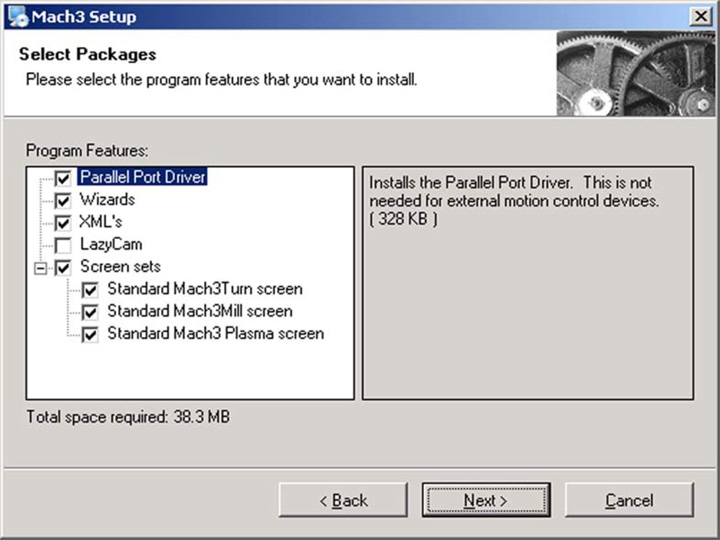
Figure1
ເມື່ອທ່ານໄດ້ເລືອກອົງປະກອບທີ່ທ່ານຕ້ອງການ, ໃຫ້ຄລິກໃສ່ປຸ່ມຕໍ່ໄປ. ຂັ້ນຕອນການຕິດຕັ້ງຈະຖາມວ່າທ່ານຕ້ອງການທີ່ຈະສ້າງ profile ແບບກໍານົດເອງ, ດັ່ງທີ່ສະແດງໃຫ້ເຫັນໃນຮູບພາບ 2:
5. ສ້າງຫນ້າຈໍ profile custom.
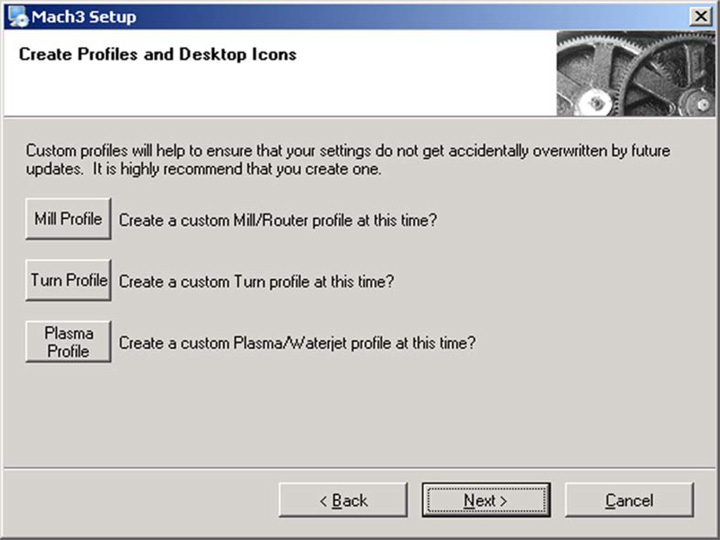
ຮູບ 2
ຕົວຢ່າງ, ຖ້າທ່ານຄລິກໃສ່ປຸ່ມ "Mill Profile", ຫນ້າຈໍທີ່ສະແດງຢູ່ໃນຮູບ 3 ຈະປາກົດ. ແນ່ນອນ, ທ່ານຄວນເລືອກປຸ່ມ profile ທີ່ເຫມາະສົມສໍາລັບເຄື່ອງມື CNC ຂອງທ່ານ.
6. ສ້າງ "ໂປຣໄຟລ໌ໂຮງງານ".
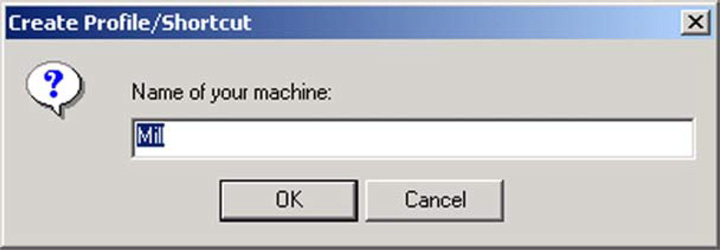
ຮູບ 3
ໃສ່ຊື່ທີ່ທ່ານຕ້ອງການທີ່ຈະກໍາຫນົດໃຫ້ profile ແລະໃຫ້ຄລິກໃສ່ປຸ່ມ "OK". ຖ້າທ່ານຕ້ອງການ, ທ່ານສາມາດສ້າງໂປຣໄຟລ໌ທີ່ແຕກຕ່າງກັນຫຼາຍ. ເມື່ອທ່ານໄດ້ສ້າງໂປຣໄຟລ໌ທີ່ກໍາຫນົດເອງຂອງທ່ານ, ໃຫ້ຄລິກໃສ່ປຸ່ມ "ຕໍ່ໄປ".
7. Reboot ທີ່ສໍາຄັນ.
ທ່ານຕ້ອງ reboot Windows ກ່ອນທີ່ຈະແລ່ນຊອບແວ Mach3. reboot ນີ້ແມ່ນສໍາຄັນ. ຖ້າຫາກວ່າທ່ານບໍ່ໄດ້ເຮັດມັນ, ທ່ານຈະໄດ້ຮັບຄວາມຫຍຸ້ງຍາກທີ່ຍິ່ງໃຫຍ່ທີ່ສາມາດເອົາຊະນະໂດຍການນໍາໃຊ້ "Windows ກະດານຄວບຄຸມ" ເພື່ອຖອນການຕິດຕັ້ງຄົນຂັບດ້ວຍຕົນເອງ. ສະນັ້ນກະລຸນາປິດເປີດໃໝ່ດຽວນີ້.
8. ການທົດສອບການຕິດຕັ້ງ Mach3 ກັບເຄື່ອງ CNC ຂອງທ່ານ.
ມາຮອດປັດຈຸບັນ, ຊອບແວຄວບຄຸມ CNC Mach3 ຖືກຕິດຕັ້ງ, ພວກເຮົາຫວັງວ່າທ່ານຈະສາມາດເພີດເພີນກັບຊອບແວນີ້ດ້ວຍເຄື່ອງມືເຄື່ອງ CNC ຂອງທ່ານ.
Motor Tuning Best Practices for Mach3
Incorrect motor tuning is the most common reason new Mach3 users experience stalling, missed steps, or erratic axis movement. The 4 critical parameters steps per unit, velocity, acceleration, and pulse timing must match your specific hardware configuration. To calculate steps per unit correctly, multiply your stepper motor’s native steps per revolution (typically 200 for a 1.8° motor) by your driver’s microstepping setting, then divide by the linear distance per revolution of your lead screw or the pitch of your rack-and-pinion system. For example, a 200-step motor at 16x microstepping on a 2 mm pitch ball screw yields 1,600 steps per millimeter.
Start with conservative velocity and acceleration values, then increase gradually. If a motor stalls or shudders at higher speeds, the issue is often mechanical loose belts, insufficient driver voltage, or a laptop that cannot deliver stable pulse timing. Run the Mach3 DriverTest utility to verify your PC produces a clean, flat pulse waveform before troubleshooting anything else. Desktops with dedicated parallel ports are far more reliable than laptops for Mach3 control. For detailed hardware compatibility, see the CNC router parts and accessories section to match drivers and breakout boards to your machine.
Common Mach3 Configuration Mistakes to Avoid
Forum discussions across CNCZone and Mach Support consistently highlight the same beginner errors. Unit mismatch is the most frequent: Mach3 defaults to metric, so users who set up their steps-per-unit in inches without changing the native units to imperial will see drastically wrong movements. Always confirm the native units setting under Config > General Configuration before entering any motor tuning values.
Reversed axis direction causes G-code to cut mirror images. Rather than swapping motor wiring, toggle the DirLowActive checkbox in Ports and Pins for the affected axis. Missing kernel frequency adjustment is another overlooked step higher kernel rates (up to 100 kHz on capable PCs) allow smoother motion at fast feed rates, but can overload slower machines. If you encounter stuttering during complex toolpaths, review our 22 common CNC router problems and solutions for additional diagnostic steps.
Which CNC Machines Work Best with Mach3?
Mach3 is most widely used with routers CNC ແລະ ເຄື່ອງຈັກ CNC milling, particularly hobby and small-shop setups running stepper motors through parallel-port breakout boards. It also supports plasma cutting profiles with THC integration and lathe operations via its dedicated Mach3Turn interface. However, Mach3 is a legacy platform it requires Windows XP through Windows 7 for optimal parallel-port performance, and Artsoft no longer actively develops new features. Shops evaluating alternatives should compare Mach3 against newer options listed in our CNC programming software guide, including Mach4, UCCNC, and LinuxCNC.
For first-time CNC owners building a hobby router CNC setup, Mach3 remains a solid choice thanks to its large user community, extensive wizard library, and straightforward G-code visualization. The free demo version runs up to 500 lines of G-code and operates in simulation mode without a parallel-port driver, ideal for learning before committing to a licensed copy.
ຄໍາຖາມ
Why does Mach3 freeze mid-job without displaying an error message?
Almost always a PC issue, background Windows updates, power-saving modes, or a slow hard drive choking on large G-code files. Disable sleep and Windows Update during operation, and run DriverTest.exe to confirm stable pulse output.
Can Mach3 run on Windows 10 or 11?
Not with the built-in parallel port driver, it only works on 32-bit Windows XP through 7. For Windows 10/11, install an external motion controller like a Warp9 SmoothStepper (Ethernet) or UC100 (USB) that handles pulse generation outside the OS.
My spindle won’t start when I press Cycle Start, What happened?
Usually a missing or corrupted Macros folder. Verify Mach3\Macros\Mach3Mill\ exists and contains your M-code scripts. If the folder was moved or deleted, reinstall Mach3 to a temp directory and copy the Macros folder back.
Why does my G-code cut a mirror image of the design?
One axis has its direction reversed. Toggle DirLowActive in Ports and Pins > Motor Outputs for the affected axis instead of swapping motor wires. Re-jog to confirm positive movement matches your coordinate convention.
Why do my custom M-code Macros work in the VB editor but fail during a program run?
Mach3 saves Macros to the default profile not necessarily the active one. Verify the macro file exists in the correct profile’s Macros subfolder. If using clone profiles for testing, copy macro files manually between directories.
What’s the most stable Mach3 version to install?
Community consensus points to R3.043.062 or R3.043.066 fewest reported bugs with motion controllers and Macros. Always back up your XML profile before upgrading.
My machine stops randomly, but the program keeps running on the screen, why?
This points to a transient electrical fault typically a noisy e-stop switch or loose limit-switch wiring triggering a brief hardware stop without latching in Mach3. Check all switch connections, replace suspect switches, and add shielded cable on input lines.
Can I use a generic USB-to-parallel adapter with Mach3?
No. Generic adapters lack real-time pulse timing. Use a dedicated motion controller (SmoothStepper, UC100) or a PCI parallel port card. Generic adapters appear connected but produce no motor movement.